
Amazon Echo Hub: Is the Smart Home Panel Worth It?

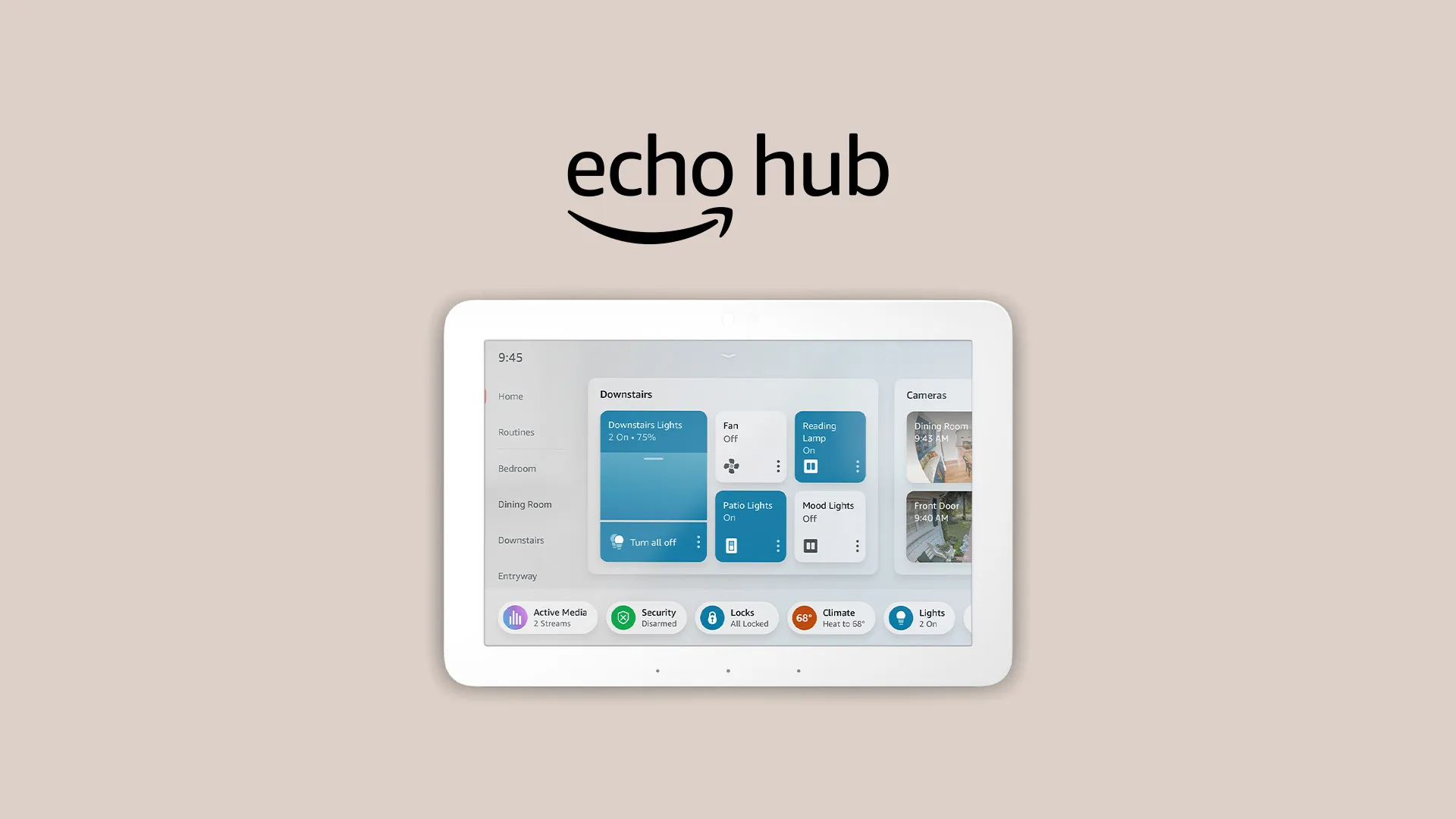
Amazon's Echo Hub just got a customizable home screen and Ring AI features. Here is what the smart home panel update does and whether the Echo Hub is worth it.
Key Takeaways
- Amazon's free Echo Hub update redesigns the home screen with a fully customizable layout, fixing the rigid interface the $180 panel launched with in 2024.
- New features let you organize devices by room, create custom groups, resize tiles, dim lights from 1% to 100%, and trigger routines with a single tap.
- The Echo Hub now adds Ring AI Video Search and camera event summaries, but those features require both Alexa Plus and a Ring AI subscription.
On this page
Is a wall-mounted screen that does little more than show controls worth $180, or does Amazon's new update finally change that math?
Amazon has rolled out a free software update for the Echo Hub that redesigns the home screen and adds Ring AI features, giving the smart home panel a real reason to reconsider it.
Is the Amazon Echo Hub worth it after the update?
The Echo Hub is more worth it now than at launch, because the free update fixes its biggest weakness, a rigid interface.
The Echo Hub is an 8-inch wall-mounted display priced at $180 and focused on smart home control.
According to The Verge, the update gives the home screen a much-needed overhaul of the interface it launched with in 2024, with a cleaner, fully customizable layout that fits more smart home info and controls on screen.
During normal operation, the Hub shows controls for the devices you use most, including those using Matter, Zigbee, Thread, and Bluetooth, as long as they work with Alexa.
The practical upside is that you are no longer stuck with a fixed layout, which is what often makes a dedicated panel feel limiting compared to your phone.
What the new Echo Hub customization does
The headline change is deep home-screen customization.
You can move tiles around, enlarge or shrink them, and choose specific devices to add to the home screen for easier access.
Amazon highlighted five new features for the Echo Hub:
- Organize by room or function, such as Bedroom, Downstairs, or Climate, then control all devices in a group with a single tap.
- Create your own groups from the bottom bar, which are then accessible via voice and the app as well.
- Arrange and resize sections and tiles with drag-and-drop, making commonly used ones bigger.
- Access granular device settings by tapping the three dots on any device.
- Quick access to common Routines directly from the home screen with a single tap.
Devices are now grouped automatically by room and function, but you can still create your own groups manually, including routines you previously set up.
Granular controls that matter more than they sound
The more detailed controls are a bigger deal than they first appear.
For supported smart light bulbs, you can now dim them from 1% to 100% and choose specific colors, with a color wheel on compatible bulbs.
Each tile also gets a power button for instant on/off control.
What is easy to miss is that this turns the Hub from a basic on/off panel into something closer to a full lighting controller mounted on your wall.
The Ring AI update for the Echo Hub
The Echo Hub now gains Ring AI features, which is the update's other major addition.
If you use Alexa Plus, free with Amazon Prime or $20 per month, and have a Ring AI subscription for Ring security cameras, the Hub can provide a summary of camera events and video clips of the relevant actions, such as delivered packages, for up to four feeds at the same time.
It also adds Ring AI's Video Search, letting you use natural language to search through your smart home camera footage directly on the Hub with Alexa voice commands.
This matters because it pulls security monitoring onto the same panel you already use for lights and routines, reducing the need to jump between apps.
Who the Echo Hub is for
The Echo Hub fits people who want a dedicated, always-on control panel rather than a multipurpose screen.
Unlike Echo Show devices, which have traditionally had a broader focus like video calls and TV shows, the Hub is built specifically around smart home control.
If your home runs on Matter, Zigbee, Thread, or Bluetooth devices that work with Alexa, the customizable layout now lets you build a dashboard around how you actually use them.
The honest limitation is the recurring cost, since the best camera features depend on both Alexa Plus and a Ring AI subscription rather than the $180 hardware alone.
Echo Hub at a glance
| Detail | Specification |
|---|---|
| Display | 8-inch wall-mounted panel |
| Price | $180 |
| Focus | Smart home control |
| Connectivity | Matter, Zigbee, Thread, Bluetooth (Alexa-compatible) |
| Camera features | Requires Alexa Plus plus a Ring AI subscription |
For now, the update is free and rolling out to existing Echo Hub devices, so current owners get the redesign without buying new hardware.
Frequently asked questions
How much does the Amazon Echo Hub cost?
The Amazon Echo Hub is an 8-inch wall-mounted smart home display that costs $180.
What does the new Echo Hub update add?
The free update adds a fully customizable home screen, room-based groups, resizable tiles, granular light controls from 1% to 100%, quick routine access, and Ring AI camera features.
Do the Echo Hub camera features cost extra?
Yes. The Ring AI Video Search and camera event summaries require Alexa Plus, free with Amazon Prime or $20 per month, plus a Ring AI subscription.
About the author
The Mixstackrr Team is a group of writers and editors with more than 10 years of combined experience in SEO and consumer tech. We test devices, dig through settings, and turn everyday tech problems into clear, step-by-step guides anyone can follow.