Cherry MX Switches Explained: Colors & How to Choose

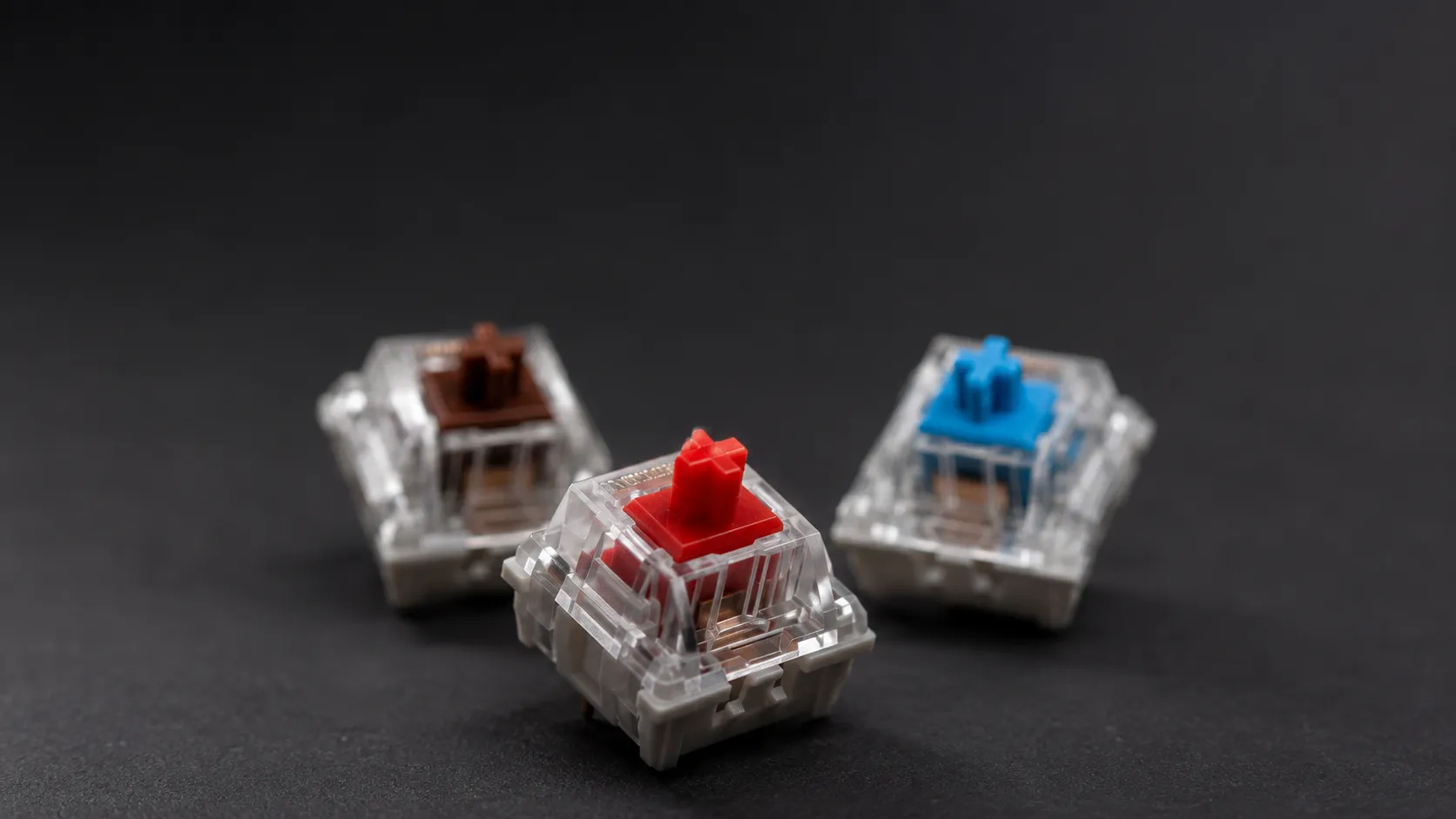
Cherry MX switches explained by color: compare Red, Brown, Blue, Black, and Speed Silver by feel and force, then pick the right switch for your keyboard.
Key Takeaways
- Cherry MX switch colors map to three feel types: linear (Red, Black, Speed Silver), tactile (Brown), and clicky (Blue).
- Actuation force ranges from 45 cN (Red, Speed Silver) to 60 cN (Black, Blue); lighter switches suit gaming, heavier ones reduce typos.
- Cherry guarantees its standard MX switches for over 50 million keystrokes, the durability benchmark clones now chase.
On this page
You have probably seen mechanical keyboards sold by switch color, with Red, Brown, and Blue thrown around as if everyone already knows the difference.
Those colors are not decoration, they are a code for how a switch feels, how much force it takes to press, and what it sounds like.
What Are Cherry MX Switches?
Cherry MX switches are mechanical key switches made by the German manufacturer Cherry, and each color identifies a specific combination of feel, actuation force, and sound.
Cherry MX switches matter because Cherry defined the modern mechanical keyboard market, and its color naming became the shared language that nearly every other brand now imitates.
A switch sits under each keycap, and instead of the mushy rubber dome found in cheap keyboards, it uses a spring and a precise contact mechanism that registers your keypress at a fixed point.
According to Cherry's official switch overview, the standard MX line is guaranteed to last over 50 million keystrokes, a durability figure Cherry says no other manufacturer guarantees.
If you are still deciding between mechanical and membrane boards before you even get to switch color, start with our keyboards guides for the wider buying context.
The Three Switch Families: Linear, Tactile, and Clicky
Every Cherry MX color falls into one of three feel categories, and understanding these three is faster than memorizing every individual color.
Linear switches move straight down with no bump and no click, giving a smooth, consistent press from top to bottom.
Tactile switches add a small bump partway through the press so your finger feels the exact moment the key registers.
Clicky switches keep that tactile bump but add a sharp audible click, which is satisfying to some typists and irritating to nearby coworkers.
Cherry MX Colors Compared
The fastest way to choose is to compare the core specs side by side, since the differences come down to force, travel, and feel.
Actuation force is measured in centinewtons (cN), which for practical purposes maps roughly to grams of pressure, and a higher number means you press harder.
| Color | Type | Actuation force | Actuation point | Feel fits |
|---|---|---|---|---|
| MX Red | Linear | 45 cN | 2.0 mm | Gaming, light typists, beginners |
| MX Black | Linear | 60 cN | 2.0 mm | Heavy-handed typists, fewer accidental presses |
| MX Speed Silver | Linear | 45 cN | 1.2 mm | Competitive gaming, fastest actuation |
| MX Brown | Tactile | 55 cN | 2.0 mm | Mixed typing and gaming, all-rounders |
| MX Blue | Clicky | 60 cN | 2.2 mm | Typists who want feedback and sound |
The actuation force and travel figures above are drawn from Cherry's official switch specifications.
Cherry MX Red: The Gaming Default
Cherry MX Red is a linear switch with a light 45 cN actuation force, and Cherry describes it as the first choice for beginners entering mechanical keyboards.
The smooth travel and low resistance let you tap quickly and repeatedly, which is why Red dominates gaming keyboards.
What is easy to miss is that the same lightness that helps in games can cause typos for fast typists, because there is no bump to tell your finger to stop.
Cherry MX Brown: The Safe All-Rounder
Cherry MX Brown is a tactile switch at 55 cN that adds a gentle bump at the actuation point without any audible click.
In practice, Brown is the switch most people recommend to a first-time buyer who splits time between typing and gaming.
It gives you enough feedback to type accurately while staying quiet enough for a shared office or home.
Cherry MX Blue: Loud and Proud
Cherry MX Blue is a clicky switch requiring 60 cN, and it actuates after 2.2 mm with a sharp, audible click on every press.
Typists who love the sound of a keyboard at work tend to gravitate to Blue, since the click confirms each keystroke.
The trade-off is noise, so Blue is a poor pick for video calls, open offices, or anyone sharing a room.
Cherry MX Black and Speed Silver: The Specialists
Cherry MX Black is a heavier linear switch at 60 cN, suited to typists with a firm touch who want to avoid accidental key presses.
Cherry MX Speed Silver is a linear switch that actuates after just 1.2 mm of travel, the shortest in the lineup, built for competitive gamers who want the fastest possible registration.
Both are niche choices, but they solve real problems for heavy typists and reaction-focused players respectively.
How to Choose the Right Cherry MX Switch
Pick your switch by matching feel to your main activity rather than chasing whatever is most popular online.
- Choose Red or Speed Silver if you mostly game and want light, fast, linear key presses.
- Choose Brown if you split your time and want one switch that handles typing and gaming acceptably.
- Choose Blue if you type a lot, work alone, and enjoy clicky audible feedback.
- Choose Black if you have a heavy touch and keep triggering keys by accident.
If you can, test a switch tester or a friend's keyboard before buying, because feel is subjective and no spec sheet fully replaces pressing the keys yourself.
Frequently asked questions
Are Cherry MX switches better than clones?
Cherry MX switches are the original benchmark with a guaranteed lifespan of over 50 million keystrokes, but modern clones from brands like Gateron now match or undercut them on smoothness and price, so the gap is smaller than it once was.
What is the difference between Cherry MX Red and Brown?
MX Red is fully linear and smooth at 45 cN, while MX Brown adds a tactile bump at 55 cN, making Brown better for typing accuracy and Red better for fast, repeated gaming inputs.
Which Cherry MX switch is quietest?
Linear switches like MX Red and the Silent Red variant are the quietest, while clicky MX Blue is the loudest because it produces a deliberate click on every keystroke.
About the author
The Mixstackrr Team is a group of writers and editors with more than 10 years of combined experience in SEO and consumer tech. We test devices, dig through settings, and turn everyday tech problems into clear, step-by-step guides anyone can follow.