Why Won't My Chromebook Turn On? How to Fix It

A Chromebook that will not turn on is usually a charging or power issue, not a dead device. Work through these fixes in order to get it booting again.
Key Takeaways
- Most dead Chromebooks are actually drained or have a charging fault.
- Let it charge for at least 30 minutes before assuming it is broken.
- A hard reset (Refresh + Power) fixes many no-boot problems.
- A blinking or off charge light points to the charger or port.
On this page
If your Chromebook will not turn on, it is usually out of power or has a charging problem, not a dead machine. Plug it into a known-good charger, give it 30 minutes, then try a hard reset. Work through the steps below in order, since the simplest fix usually wins.
1. Check the charger and power
Start here, because a bad charge is the most common cause.
- Plug in the official charger and look for a charge light near the port.
- Try a different outlet and, if you have one, a different charger or cable.
- Let it charge for at least 30 minutes before trying to power on. A fully drained battery needs time before it will respond.
2. Do a hard reset
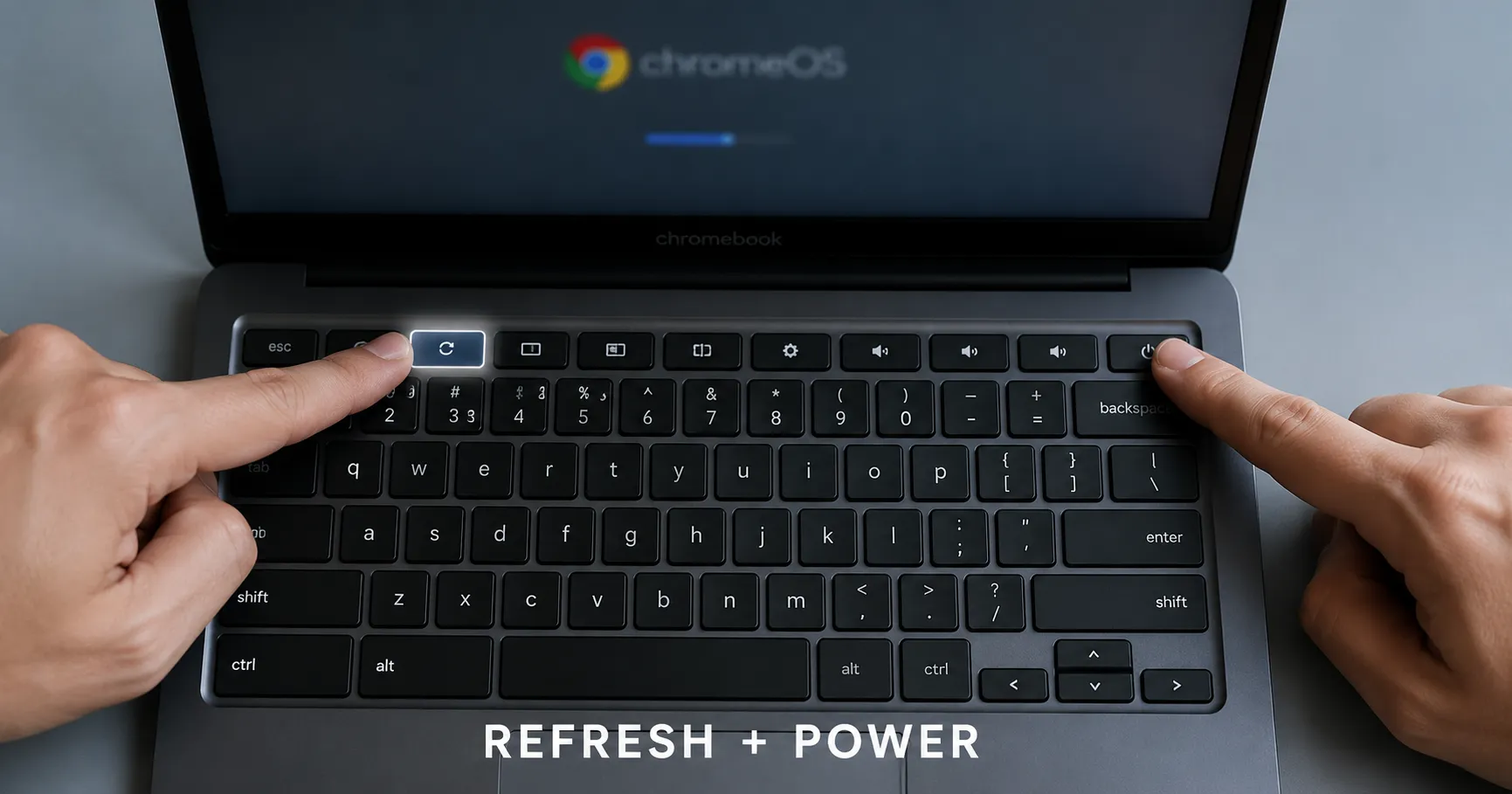
A hard reset clears the hardware state and fixes a surprising number of no-boot issues. It does not delete your files.
- Press and hold Refresh + Power for about 10 seconds.
- Release, then press the Power button normally.
- On some models you instead hold just the Power button for 30 seconds.
3. Read the charge light
- No light at all: the charger, cable, or port may be faulty. Inspect the cable and port for damage.
- Blinking light: often a charging fault. Try another charger and let it sit plugged in.
- Steady light but no boot: move on to the hard reset above.
4. Disconnect accessories and external displays
A faulty USB device or monitor can stop a Chromebook from booting properly. Unplug everything, including USB hubs and external screens, then try again.
5. When it is time for service
If the charge light works, you have tried a hard reset, and it still will not boot, the issue may be the battery or board. Contact the manufacturer or a repair shop, especially if the device is under warranty. As a last software resort before that, you can try to recover or factory reset the Chromebook from a USB image.
Recap
Charge it on a known-good charger for 30 minutes, do a Refresh + Power hard reset, read the charge light, and unplug accessories. If none of that works, it is a hardware issue worth servicing.
Frequently asked questions
How do I force restart a Chromebook that will not turn on?
Hold Refresh + Power for about 10 seconds, release, then press Power. On some models, hold the Power button alone for 30 seconds.
My Chromebook will not turn on but the light is on. What now?
A steady charge light with no boot usually means a hard reset is needed. Hold Refresh + Power for 10 seconds, then power on.
How long should I charge a dead Chromebook before it turns on?
Give it at least 30 minutes on a known-good charger. A fully drained battery will not respond immediately.
About the author
The Mixstackrr Team is a group of writers and editors with more than 10 years of combined experience in SEO and consumer tech. We test devices, dig through settings, and turn everyday tech problems into clear, step-by-step guides anyone can follow.