
iOS 27 Dictation: How to Enable the Big Upgrade

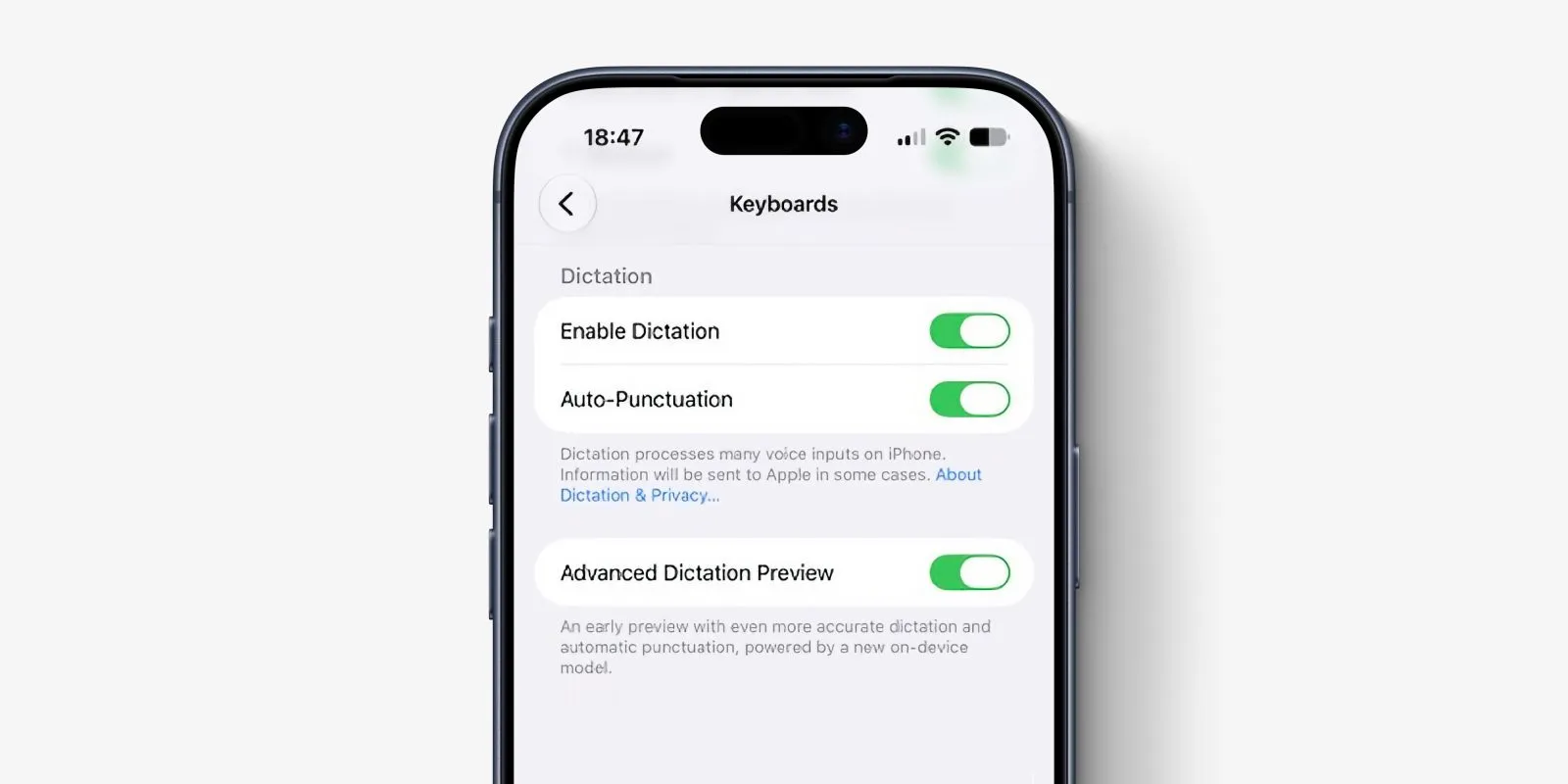
iOS 27 dictation got a major upgrade, but it ships off by default. Here is the exact setting to enable it, which iPhones qualify, and what actually changed.
Key Takeaways
- iOS 27 Advanced Dictation Preview is off by default; enable it at Settings > General > Keyboards.
- Only the iPhone 17 Pro, 17 Pro Max, and iPhone Air qualify, because the feature needs at least 12GB of RAM.
- The advanced system runs on-device and adds punctuation and capitalization automatically as you speak.
On this page
The biggest dictation improvement in iOS 27 is switched off by default, and most users never find it.
According to Digital Trends, the upgrade is called Advanced Dictation Preview, and it only appears on a short list of devices that meet a hard hardware requirement.
How to enable Advanced Dictation in iOS 27
If your iPhone qualifies and is running the iOS 27 beta, the setting lives inside the keyboard menu, not the main Siri or Accessibility screens.
- Open the Settings app on your iPhone running iOS 27 beta.
- Tap General.
- Tap Keyboards.
- Scroll down to find Advanced Dictation Preview.
- Flip the toggle on to switch from the standard dictation system to the advanced one.
The option will not appear at all on iPhones that fall below the hardware cutoff, so an empty Keyboards menu means your device is not supported rather than a bug.
Which iPhones support iOS 27 Advanced Dictation
Advanced Dictation Preview is limited to the iPhone 17 Pro, iPhone 17 Pro Max, and iPhone Air, per Digital Trends.
The deciding factor is RAM, because the model behind the feature needs at least 12GB to run locally.
The standard iPhone 17 ships with 8GB of RAM, which is why it is excluded, and even the iPhone 16 Pro is left out for the same 8GB reason despite being a recent flagship.
This is a fixed hardware cutoff and not a staged rollout, so waiting for a later update will not unlock the feature on an 8GB device.
Every iPhone getting iOS 27 still receives some dictation improvements over the previous version, but only the qualifying three get the advanced system.
What changed versus old voice typing
The advanced system runs on Apple's AFM Core Advanced model, the same model powering the new expressive Siri voices.
It works entirely on-device and does not need an active internet connection, which keeps your spoken text local.
The most practical change is that it handles punctuation and capitalization automatically as you speak.
You no longer have to say "comma" or "period" out loud to format a sentence, which removes the most tedious habit of older voice typing.
The trade-off is accuracy gains in exchange for a beta label, since Apple is still gathering opt-in feedback to fine-tune the model.
Standard vs Advanced dictation in iOS 27
iOS 27 ships with two separate dictation systems, and the one you get is decided by your hardware rather than a setting you choose.
| Aspect | Standard dictation | Advanced Dictation Preview |
|---|---|---|
| Supported devices | All iPhones on iOS 27 | iPhone 17 Pro, 17 Pro Max, iPhone Air |
| RAM requirement | 8GB and up | At least 12GB |
| Underlying model | Previous dictation engine | AFM Core Advanced (on-device) |
| Auto punctuation and capitalization | Manual spoken commands | Automatic as you speak |
| Default state | On | Off, opt-in toggle |
The data above is drawn from Digital Trends' hands-on report, the only one of the three sources reviewed here that covers dictation in detail.
The two broader iOS 27 roundups from Digital Trends and TechCrunch focus on features like the redesigned Fitness app, the improved Cleanup photo tool, on-screen awareness, and Apple Wallet bill splitting, and neither singles out dictation, which is part of why the upgrade is easy to overlook.
Is iOS 27 dictation available yet
iOS 27 is currently a beta release, and all three sources reviewed here are dated to the period right after Apple's WWDC keynote.
One Digital Trends writer reports running the iOS 27 beta daily on an iPhone 16e, which confirms the software is already in testers' hands, though that base model does not qualify for Advanced Dictation Preview.
TechCrunch notes the features are available to developers right now through the Apple Developer Program, with a public beta arriving the following month.
The practical takeaway is that you need both a qualifying device and the beta installed before the dictation toggle will show up, so most users on a stable iOS build will have to wait for the public rollout.
Why the upgrade matters right now
Dictation arriving off by default means the people who would benefit most, frequent voice typists, are the least likely to discover it without checking the keyboard settings.
What is easy to miss is that the 12GB requirement ties this feature to Apple's broader on-device AI strategy, the same constraint that shapes which phones run the newest models well.
If you are weighing the whole release rather than this one feature, our guide to what is new and worth it in iOS 27 covers the rest of the update.
The timing is also notable because, as reported by TechCrunch, the iOS 27 features are in developer testing now with a public beta arriving the following month, so most readers will be able to try this soon.
For now, if your iPhone makes the cut and you dictate often, enabling the toggle is a low-risk way to get a measurably better experience while the feature is still in preview.
References:
- Digital Trends, iOS 27 puts a much better dictation experience on your iPhone, and you must enable it. Accessed on Jun 21, 2026
- Digital Trends, I’ve tried nearly every iOS 27 feature, and these 3 are why I’m still excited about the update. Accessed on Jun 21, 2026
- TechCrunch, Every new iOS 27 feature that’s worth knowing about. Accessed on Jun 21, 2026
Frequently asked questions
Is iOS 27 Advanced Dictation on by default?
No. According to Digital Trends, Advanced Dictation Preview ships switched off because it is still in beta, so you must enable it manually under Settings > General > Keyboards.
Why does my iPhone not show Advanced Dictation Preview?
The feature needs at least 12GB of RAM. The standard iPhone 17 and the iPhone 16 Pro have 8GB, so the option does not appear on them. It is a fixed hardware cutoff, not a staged rollout.
Does iOS 27 dictation work without internet?
Yes. The advanced system runs on Apple's AFM Core Advanced model entirely on-device, so it works without an active internet connection.
About the author
The Mixstackrr Team is a group of writers and editors with more than 10 years of combined experience in SEO and consumer tech. We test devices, dig through settings, and turn everyday tech problems into clear, step-by-step guides anyone can follow.